Phone Calls
Only clinic owners, clinic staffs, and injectors who are assigned to a phone number can receive incoming calls.
How to give a phone number access
To grant a Clinic Staff or VA access to a phone number:
- Go to: Accounts > Clinic Staffs
- Assign the phone number to the clinic staff member who needs call access.
How to Receive Incoming Calls (For VA / Clinic Staff)
Once access is granted, follow these steps to begin receiving calls:
- Log in to PMC.
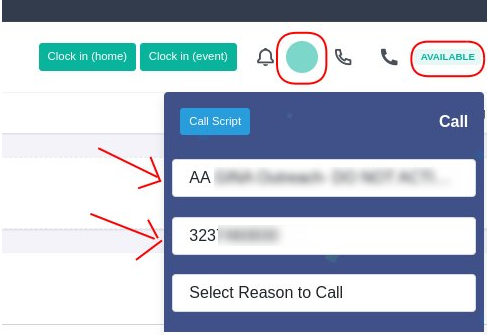
- Click the White Phone Icon (top bar).
- Select: Clinic, Phone Number
- Confirm both indicators show the account is ready to receive calls:
✅ A Green Beam Icon is visible
✅ Green “Available” status is displayed next to the username
Please see below image
How to change online status
If a VA or Clinic Staff needs to step away or temporarily stop receiving calls:
Click the “Available” status to switch to “Not Available”.
This will pause incoming calls for that user until they switch back to Available.