Transactions, Raw Data & Direct Expense
Transaction types
These are the transaction types that we handle on PMC:
- Treatments
This is when patient booked an appoitnment and treated based on the treatment they've chose. - Buy Items
This is the product/ items the patient buy. Click here to learn more about buy items. - Gift card
We count the income when a patient buy a gift card, not when gift card is redeemed. - Injection bank
This is when a patient "buys treatment" that is not being used right away. The patient would use it in the future, with advanced payment. Click here to learn more about injection bank. - Subscriptions
You can offer subscription plans to the patients.
Reporting Data Flow
To avoid any mistake, please finish all transactions on the same day as event date. It will make the audit faster and reduce errors.
On PMC, certain reports are interconnected — meaning one report impacts the accuracy of the next.
To ensure accurate reporting, follow the best practices below.
The correct sequence of reporting is:
- Stat Report
- Raw Data
- Direct Expense
Note: If the Stat Report is incorrect, then Raw Data and Direct Expense will also be incorrect.
Best Practices for Accurate Reporting
- Mark Completed Appointments as “Finished”
Only Finished appointments will appear in Raw Data.
To verify if a booking is finished:
- From top left menu, select Appointments > Bookings
- Look for a red warning that says: “Please Finish”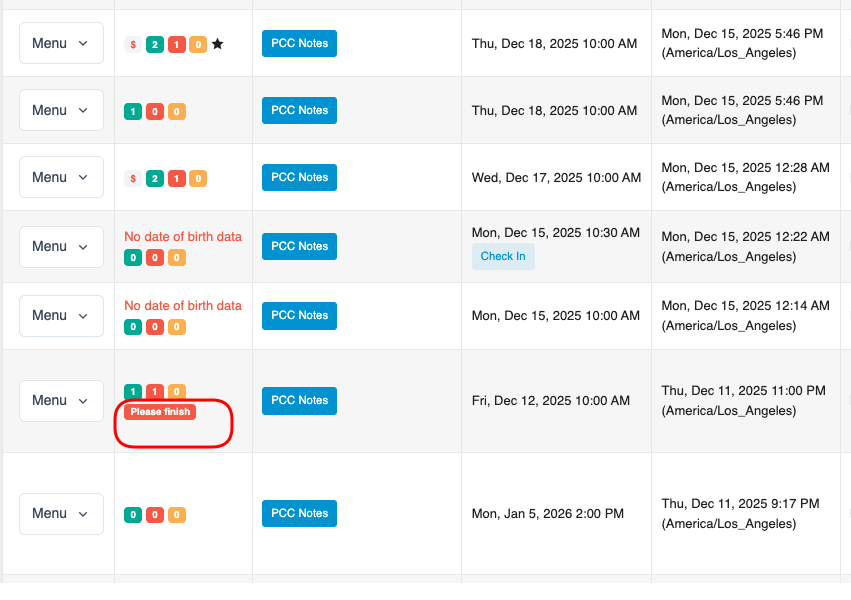 Do not forget to check "Unresolve bookings" page. If you see any transaction listed there, you need to finish it immediately.
 - Check the Stat Report After Each Event Ends
Review the Stat Report immediately after the event finishes.
This step prevents data mismatch between:
- PMC Report
- Actual Event Results
Why This Matters
- Stat Report feeds data into Raw Data.
- Raw Data feeds data into Direct Expense
Any error left uncorrected at Step 1 will continue through all reporting layers